I just posted an article which demonstrate code highlighting in blogger. I get the highlighting feature from here: http://code.google.com/p/google-code-prettify/
Additional Reference : http://lukabloga.blogspot.com/2008/10/to-test-new-highlighting.html
Hope you enjoy it.
Friday, November 27, 2009
Code highlighting in Blogger
Posted by
Teguh Eko Budiarto
at
Friday, November 27, 2009
0
comments
SVN::Notify::HTML::ColorDiff modification
We are using SVN to save our works and hooking a post-commit script which one of the function is to send e-mail regarding the changes that had just made. We are using the wonderful SVN::Notify, a perl application to do the job. It already have the functionality to produce a beautifully diff colored HTML email using the SVN::Notify::HTML::ColorDiff module as the handler.
However, since we are using web based Google Apps Gmail interface as our email client, the HTML was not rendered nicely because the CSS is not applied inside the interface. We need to change the CSS to the inline style. And then I found a patch done here. Because it is a direct hack, I want it to be more generic that the user can choose the inline style or not, then I modified a little bit more. I added optional parameter --css-inline to generate CSS style directly inline with the HTML tags. I had submitted the changes to the original author hoping he will include this option in the next revision. Just in case, I also put it here.
Snippets to add the additional parameter:
package SVN::Notify::HTML;
# $Id: HTML.pm 4617 2009-03-19 17:04:53Z david $
use strict;
use HTML::Entities;
use SVN::Notify ();
$SVN::Notify::HTML::VERSION = '2.79';
@SVN::Notify::HTML::ISA = qw(SVN::Notify);
__PACKAGE__->register_attributes(
linkize => 'linkize',
css_url => 'css-url=s',
wrap_log => 'wrap-log',
css_inline => 'css-inline',
);
You may download the full source below:
Posted by
Teguh Eko Budiarto
at
Friday, November 27, 2009
0
comments
Saturday, October 17, 2009
Screen and Vim (and Skype) for Remote Pair Programming
I don't know if everybody follows VoiceTechnology Google Group:
http://www.linux.com/archive/feature/56443
Original Post:
2009/10/17 Fabrício
Sent to you by Fabrício via Google Reader:
Bem, é notável o crescimento das metodologias ágeis de desenvolvimento de software. Uma das práticas que me agrada muito, é a programação em pares (pair programming). É bem perceptível, a um longo prazo, a diferença que faz essa prática. Navegando pela internet, como um marujo sem rumo, encontrei um post falando sobre Remote Pair Programming. Parece meio estranho, porque o XP (eXtreme Programming) faz alusão a uma dupla programar em um único computador, com um único teclado e um único mouse.
Então, vamos tentar simular este ambiente utilizando 4 ferramentas simples:
- screen
- ssh
- vim
- skype
Destas, só o skype não é open-source. Mas é interessante manter uma conversa verbal, pois conversas escritas podem desviar o foco da programação, que é bem mais rápida e precisa do que a escrita, que pode deixar brechas para má interpretações. A conversa verbal consegue interromper o programador ao mesmo tempo em que escreve, corrigindo-o ou questionando-o.
Conectados no skype, basta decidir em qual máquina será o desenvolvimento. Esta, por sua vez, terá que ter um servidor ssh. Ela será o host da programação. Será necessário, também, nesta máquina, ter instalado o screen, que é um programa que possibilita criar ’sessões’ no terminal.
Host
screen -S PairProgramming
Parece que nada mudou, mas você está numa sessão do screen chamada PairProgramming.
Precione CTRL+a e digite:
:multiuser on
Pressione CTRL+a novamente e digite:
:acladd usuarioclient
Tudo que você ver nesta sessão, será visto pelo outro usuário (usuarioclient) que se conectará nela.
Então, abra o vim, pois será necessário um edito de textos de verdade , e se divirta:
vim /caminho/arquivo
Client
ssh usuarioclient@host
screen -x usuariohost/PairProgramming
Pronto! Agora você está acessando a mesma seção! Tudo que o usuáriohost fizer, o usuárioclient enxergará e vice-versa.
Agora, basta descutir a tarefa via Skype e programar. As atualizações são em tempo real, ou seja, aparecem ao mesmo tempo que são escritos, digo… depende da conexão, mas não é um grande problema.
Caso seja necessário que o usuarioclient não possa modificar o código, apenas assitir e dar pitacos, o usuáriohost deve pressionar CTRL+A e digitar:
:aclchg usuarioclient -w #
Eu ainda vou programar assim, depois digo a experiência.
Referências
Posted by
takeshi
at
Saturday, October 17, 2009
0
comments
Wednesday, September 2, 2009
Using google chat translator bots in group
Well, this is not related to programming but our fellow Bruno told me to put here and I can finally be out of the list of persons that never put something here!
In google chat, there are "bots" that you can invite, like below:
The interesting trick is that you can invite them in a group chat, and
making them work as a real time translators.
This is very useful for example when 2 persons of different native languages
need to chat using english.
If a japanese and a brazilian need to chat, you can call en2ja@ and ja2en@ and
form a group chat of 4. The japanese guy can write in japanese and the brazilian guy can
write in english.
Of course, the translation is not perfect, but it helps.
Posted by
stkasuga
at
Wednesday, September 02, 2009
0
comments
Friday, August 7, 2009
As we are talking about future, how about look into the new technologies appearing for UI?
This blog posted a very interesting list of futuristics interfaces:
http://www.technologyreview.com/blog/editors/23940/
More some years, and the Jetsons will be completely outdated, hehehe!
Posted by
Kaja
at
Friday, August 07, 2009
0
comments
Microsoft Office Labs Vision 2019
Posted by
Cristian Yamashita
at
Friday, August 07, 2009
0
comments
Monday, July 13, 2009
LG Launching App Store In South Korea
I think now we will have a good fight with the apple store, because to create a apple app, the programmer need the apple machine too. And the LG run with Java.
Maybe the Java can run a little more slow then Apple, but of course we will have more developers finding the best way to use all the features of the cellphone.
Check more in Akirabaranews.
Posted by
Fabiano Ozahata
at
Monday, July 13, 2009
0
comments
Compare the languages.
Posted by
Cristian Yamashita
at
Monday, July 13, 2009
0
comments
Labels: programming
Monday, July 6, 2009
Gaikai - Streaming Worlds
Some time ago, I talk about a "OnLive gaming demostrated live", now another company enter to compete, called: Gaikai
And I still talking: imagine in a future you don't need computer (or a powerful computer) in home or work and make easy create a war room.
Posted by
Fabiano Ozahata
at
Monday, July 06, 2009
0
comments
Monday, June 22, 2009
Open source versus commercial software
Posted by
Cristian Yamashita
at
Monday, June 22, 2009
0
comments
Labels: Free, Linux, Open source, Software, Windows
Thursday, June 18, 2009
How technology changed us

From: Bits & Pieces
Posted by
Fabiano Ozahata
at
Thursday, June 18, 2009
0
comments
How not to use the PowerPoint
You try make a presentation to a boring meeting, you need follow the advice below. hehehe
Posted by
Fabiano Ozahata
at
Thursday, June 18, 2009
0
comments
Tuesday, May 26, 2009
Agressive advertising!!
I was reading a blog, and someone post this video about a CM advertising windows 1.0. Is this real? I couldn't believe when I saw it.
Only $99!! LOL!! It looks like TV shopping!!
Check it with your very own eyes:
Posted by
Kaja
at
Tuesday, May 26, 2009
0
comments
Labels: advertise, Microsoft, Steve Balmer, windows 1.0
Friday, May 8, 2009
Double Windows, Same User Path
When you install a lot of stuff in the windows this became a little slow (Really SLOW) and what is the better think to do? Format and install from zero.
BUT the windows have limitations on the activation key (Like I buy a car and when I need change some pieces, I need get permission of authorized to do something with already is ours), I had a lot of disappointment about windows, but i need to see the new games enter in the market and programming, for this reason (activation key) I found another way to stay with a original windows: Make a image.
Here i have a problem. When I recover the image, all my settings is lost.
So I decide make one partition to games and other to programming, but have other problem. I have program who like to use in both parts, so more one partition to put my stuff.
With the release of Windows 7 RC I decided check and make this tutorial for the people who like continue working with your computer while having time to leisure.
The first step is create a partition. You can user the Partition Magic or other freeware. You can check The Free Country. I not teach this part because I already have have a two partition and just resize one of. My HD is 320GB divided in order (70GB, 180GB, 70GB) all primary, formatted with NTFS. This is important when you will change the active partition.
Make sure you set the 3th partition to install the windows. After install the windows when you insert a name of user, put anyone, because after we will discard (Don't install any program. Is this part we start the settings).
To change the register I use the freeware program, is very fast to make the changes, so if you like you can download the Registrar Registry Manager. After all make a backup of register with this program (File->Backup and Restore) if you make some mistake, you can restore the original file.
Make a look if the windows make this settings in the HD:
- Administrative Tools->Computer Management
Is very important the common data stay in the middle and the drive name with E:. If is not, in the same program you can change: click with right button in the drive and select "Change drive letter and paths ...".
Starting
I decide create the users path in the E:\Data\Users\ because all the information in the "Data" directory is used to put document, settings, etc.
In the Windows Explorer:
Make a copy of "Default" and "Public" directory in "C:\Users\" to "E:\Data\Users\"
In the Registrar Registry Manager:
Click in Search->Search registry (Ctrl+F). In "What to look for" Leave only "Data" checked
Search to a "\Public" text and the result will come the following information below:
Make a new seach with "C:\Users\Public", select all (Ctrl+A), Right Button->Replace.
Change to the new directory:
Now we can create a new account with administrator that will use to login in the new directory.
Restart the windows and select the new account (Don't use logoff).
Wait the windows create a new profile and check the directory if the user already created in the new directory.
Now you can copy the old user to the new directory
Enter again in the "Registrar Registry Manager" and change the others "C:\Users\" directory to
Restart again the windows and enter the older user.
This time you can change all the "C:\Users" to a new directory
Restart again the windows and select any user you like.
I advice delete the old User, because as you made a copy of the original with the new user, the new user become owner of the file, so if you want to keep the old User, you need make this changes. (Hint: when the file was copied, the read-only attribute was also copied with the new user as a owner, so when you try use some features like download, will can't save).
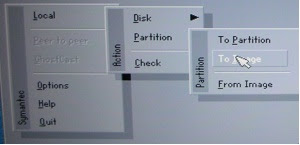
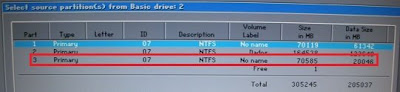
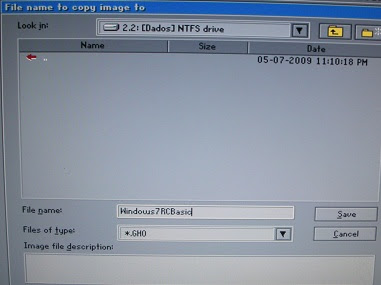
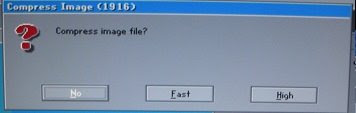
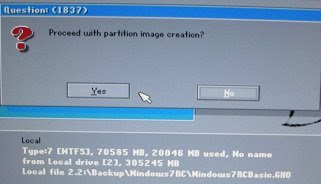
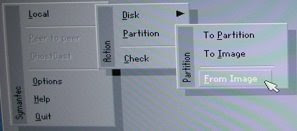
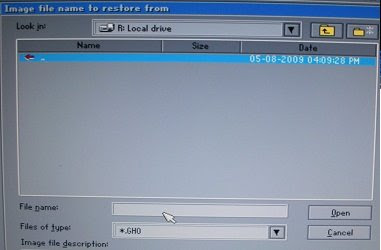
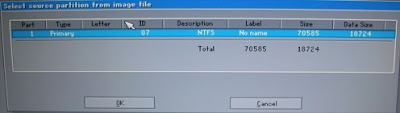
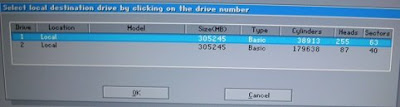
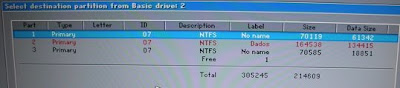
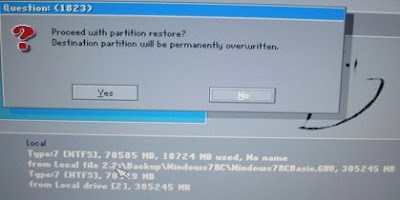
With all basic installation, now we create the image (I will use the Norton Ghost or a interesting program called Hiren's, which contains a excellent programs for the computer configuration).
My first experience with Norton I lost all my data because I didn't know how to make the image, for this reason I took photos step by step to follow.
NOTES:
- I am not responsible for ANY DAMAGE incurred from the misuse of this material or instructions contained here. Make at your own risk.
- Don't have a boot menu choice because we install the equal image an the MBR make crazy (If you see in the partition magic the information came Error #110). To change the partition you need use the Computer Management (Administrative Tools->Computer Management), select the drive you like change and in the right click select "Make partition as Active). The good part is that you just change to another partition if you want.
When you like recover again the image, first update the windows and all the softwares you installed and create a new image again.
Have fun!
Posted by
Fabiano Ozahata
at
Friday, May 08, 2009
0
comments
Wednesday, April 15, 2009
What can we learn about usability…
Posted by
Fabiano Ozahata
at
Wednesday, April 15, 2009
0
comments
Tuesday, April 14, 2009
Computer Science without computer? It's possible???
This is a proposal of the site Computer Science Unplugged with a series of computer knowledge to make without computer such as binary numbers, algorithms and data compression through games and puzzles that use cards, string, crayons and lots of running around.
It is easy and very fun.
Posted by
Fabiano Ozahata
at
Tuesday, April 14, 2009
0
comments
Friday, April 3, 2009
Online meeting - Desktop Sharing App
I needed to do desktop sharing with one of my friend, and was looking into several desktop sharing / online meeting apps which are FREE. And I found a very good application that is quite simple and easy to setup, and this is my choice. It called Mikogo (http://www.mikogo.com).
It can by pass firewall and you don't need any static IP and it is very easy to setup a meeting.
You can have online meeting with multiple users. It allows the meeting attendees to switch to become presenter, or even the take control of the presenting computer. Oh, only one computer can be a presenter at a time. Another feature that I like, that you can choose which application that can be shared. So, you can keep all the running apps in background while you are in the meeting and not worrying that the other may peek at your mess desktop :)
The lacking is, it does not have chat, voice or video yet. Even so, I don't see that as a big problem. I just combine it with Gmail Video chat and the problem solved. I am afraid if it has the video chat, the desktop sharing will get slower, since currently I am very happy with the response time.
Take a look if you have time.
Posted by
Teguh Eko Budiarto
at
Friday, April 03, 2009
5
comments
Tuesday, March 31, 2009
skype on iPhone
Skype released an iPhone version...
Does anybody have used it already?
More details in wired
Posted by
Kaja
at
Tuesday, March 31, 2009
0
comments
Friday, March 27, 2009
True or Not... be prepared
Here comes again, Conficker will return and have a new variant.
So what can we do?
More info here Beware
Posted by
moncypher
at
Friday, March 27, 2009
1 comments
Labels: Worm
'Psyb0t' worm infects Linksys, Netgear home routers, modems
Now we need worry about this. Have a virus called "psy0t" and he don't want your computer, but your modem. Check more in ZDNet and APC.
Posted by
Fabiano Ozahata
at
Friday, March 27, 2009
0
comments
Thursday, March 26, 2009
Inheritance: returning to the basics of OOP
According to MSDN:
Inheritance, together with encapsulation and polymorphism, is one of the three primary characteristics (or pillars) of object-oriented programming.
It is very simple to do it in C#, but sometimes we can fall in some traps.
Today we had a very interesting problem. How to prevent a child class to override a base class method?
Lets go to our problem: We have a base class called ContentPageBase that inherits from System.Web.UI.Page. And we want to use it as base for our WebContentPages.
But, we want to prevent those child pages to access the method Page_Load(). How to do it?
The abstract keyword enables you to create classes and class members that are incomplete and must be implemented in a derived class.(..)An abstract class cannot be instantiated. The purpose of an abstract class is to provide a common definition of a base class that multiple derived classes can share.
So the code will be like this:
public abstract class ContentPageTemplate : System.Web.UI.PageIf you try to override the method by implementing the child class:
{
protected void Page_Load(object sender, EventArgs e)
{
Page.Title = "Calling from Base Class";
}
}
cannot override inherited member 'ContentPageTemplate.Page_Load(object, System.EventArgs)' because it is not marked virtual, abstract, or override
Posted by
Kaja
at
Thursday, March 26, 2009
4
comments
Video: OnLive gaming demonstrated live, network latency discussed
Now trying to use in games, imagine in a future you don't need computer in home or work (Maybe in this case the war room will be more fast to create. hehehehe).
Online demostration
Posted by
Fabiano Ozahata
at
Thursday, March 26, 2009
0
comments
Saturday, March 21, 2009
Firefox Lover's
Reasons to install IE8 :
green : surf in web
blue : download Opera
orange : test a new anti-virus
red : download Firefox
One image is better than one thousand words... ;-)
Posted by
Fernando
at
Saturday, March 21, 2009
1 comments
Thursday, March 19, 2009
IE 8 final version.
According to a brazilian blog(meio bit) the final version of Internet Explorer 8 will be launched today, 1h in the morning JST.
I am using in my machine the demo version, and I have only one problem with my Visual Studio 2003, it doesn't run in debug mode when more than one IE window is open. Wondering why... Lets see how the final version behaves..
Posted by
Kaja
at
Thursday, March 19, 2009
0
comments
Labels: IE8, internet explorer, visual studio